
Speed control
Playback speed from 0.25× to 5× with −/+ buttons next to the skip control. Click the 1.0x button to jump back to 1×. Speed can persist across episodes.
Skips openings, endings and recaps on aniworld.to using community timestamps from the AniSkip API — plus speed control, a next-episode button and a reworked player overlay. This page documents what the fork changes, every setting, and how to build and release it.
AniWorld AP is a fork of Ziegel8171's extension. It parses the anime, season and episode from the aniworld.to page, asks the AniSkip API for the segment timestamps of that episode, and renders them as skip controls on the VOE player — in this fork with playback speed, a next-episode shortcut and a redesigned control set.
| Version |
1.7.1 — see releases
|
|---|---|
| Platform |
Firefox 142 or newer, desktop and Android. Firefox only — it uses the browser.* API.
|
| Runs on | aniworld.to and the VOE player iframe it embeds |
| Data sources | AniSkip for skip segments, AniList (with a Kitsu fallback) for MyAnimeList matching |
| Storage |
browser.storage.local only — settings and cached lookups, nothing leaves the browser
|
| License | MIT |
Everything below is specific to this fork. The base skipping logic and the AniSkip panel come from upstream; the player controls, speed handling and defaults were reworked here.
Playback speed from 0.25× to 5× with −/+ buttons next to the skip control. Click the 1.0x button to jump back to 1×. Speed can persist across episodes.
A next-episode button inside the player bar, plus automatic navigation when an episode ends. Both are on by default; auto-navigation can be switched off on its own.
The skip button stays visible for the whole episode. When no opening or ending is playing, it jumps 90 seconds ahead instead of disappearing.
Recap detection on top of OP/ED, with its own timeline colour, and a skip offset (−5 s to +5 s) so the skip can land slightly before or after the segment end.
Info toggle at the top right opens the AniSkip panel; skip, speed and next-episode controls sit together at the bottom. The skip button now carries the segment type as a badge.
The AniWorld theme (petrol background, blue accent) is the default. Classic keeps the original pink/violet look. Progress-bar marker colours are configurable per segment type.
Everything is injected into the VOE player container, so the controls survive fullscreen. The numbers below
match the screenshot. Marker colours are configurable — the defaults are opening #FF00FB,
ending #22C55E and recap #FFDD00 at 50% opacity; not every episode has all three
segments.
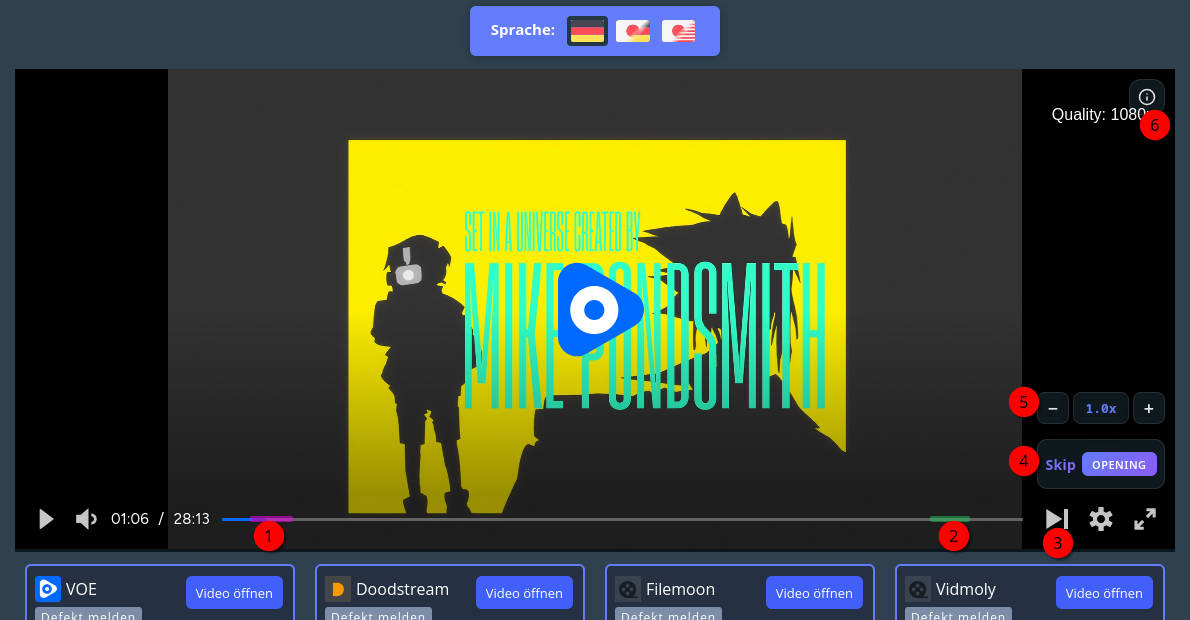
− / 1.0x / +Shows the detected anime, season, episode and MAL ID, lists every segment for the episode, and lets you search another anime or submit your own timestamps to AniSkip.
The overlay is appended to the JW player wrapper when one exists, so it stays visible in fullscreen instead of being left behind on the page body.
Defaults live in src/defaults.js as a single object — the popup, background script and
content script all read from it. Keys below match the storage keys. The reset button in the popup's
Advanced tab restores every option to these values (it needs a second click to confirm).
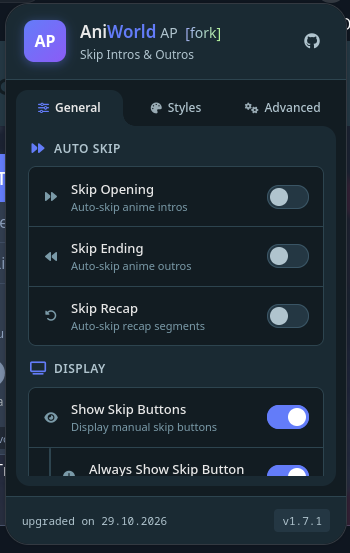
| Setting | Default | What it does |
|---|---|---|
| Interface | ||
| Languagelanguage | en | Language of the popup and the player overlay: English or German. |
| UI themeuiTheme | aniworld |
aniworld (petrol/blue) or classic (pink/violet), applied to popup and
overlay.
|
| Show skip buttonsshowButtons | on | Renders the manual skip button in the player. |
| Always show skip buttonalwaysShowButton | on | Keeps the button visible even when no segment is playing; it then skips 90 s. |
| Show speed controlshowSpeedControl | on | Shows the −/+ speed buttons and the speed 1.0x. |
| Persistent speedpersistentSpeed | on | Keeps the chosen speed when the next episode starts. |
| Skipping | ||
| Skip openingautoSkipOp | off | Automatically skip the opening segment without a click. |
| Skip endingautoSkipEd | off | Automatically skip the ending segment. |
| Skip recapautoSkipRecap | off | Automatically skip recap segments. |
| Skip offsetskipOffset | −5 s | Seconds added to the segment end after skipping. Range −5 s to +5 s in 0.5 s steps. |
| Playback | ||
| Next episodenextEpisode | on | Navigates to the next episode at the end of the current one. |
| Next episode buttonshowNextEpisodeButton | on | Shows the next-episode button in the player bar. |
| Progress bar | ||
| Opening markermarkerColorOp | #FF00FB |
Colour of opening segments on the timeline. |
| Ending markermarkerColorEd | #22C55E |
Colour of ending segments. |
| Recap markermarkerColorRecap | #FFDD00 |
Colour of recap segments. |
| Marker opacitymarkerOpacity | 0.5 | Transparency of the markers, 0.1–1.0. |
preferredLanguage and re-applied to the next episode.
The extension is split into a page script on aniworld.to, a persistent background script that owns all network access, and a player script inside the VOE iframe.
aniworld.js reads anime, season and episode number
from the breadcrumbs and URL, and applies your saved language preference.
content.js and
styles.css are injected into it and the controls, markers and panel are built.
postMessage asks the page script for the next one.
src/defaults.js — the single source of truth for settingssrc/background.js — API proxy and iframe injectionsrc/aniworld.js — page parsing, navigation, languagesrc/content.js — player overlay and skip logicsrc/popup.* — settings UI and translations
Settings, cached lookups and playback state stay in browser.storage.local, including a
random installation ID that is only sent along when you submit skip times yourself. There is no
analytics, no account and no server of our own — just requests to the public AniSkip, AniList and Kitsu
APIs.
Everything is requested up front in the manifest, so Firefox shows the full list on install.
| Permission | Reason |
|---|---|
storage |
Save settings and cached anime lookups. |
activeTab |
Let the popup push changed settings into the tab you are watching, without a reload. |
webNavigation |
Notice when the VOE player iframe finishes loading, so the overlay can be injected. |
<all_urls> |
Inject into the player subframe — its hostname changes between mirrors. |
https://api.aniskip.com/* |
Fetch skip segments and submit timestamps. |
The signed build is published on addons.mozilla.org and updates itself. Temporary installs are only for testing and disappear when Firefox restarts.
Signed build for Firefox desktop and Android, with automatic updates.
Open the listing
Make sure you land on aniworld-autoplay-fork — the upstream
aniworld-autoplay is a different add-on.
Temporary add-on, removes itself on restart.
.zip from the
latest release.
about:debugging#/runtime/this-firefox.
manifest.json.
aniworld.to. The extension only
activates inside the VOE player iframe — on other sites it does nothing.
No bundler, no TypeScript, no test runner: vanilla JavaScript, loaded straight from
manifest.json. Node is only needed for packaging.
src/.
about:debugging#/runtime/this-firefox → Load Temporary Add-on →
manifest.json.
# web-ext must be installed globally: npm install --global web-ext
# Windows
powershell -File pack.ps1

# Linux / macOS
./pack.sh
Both scripts stamp the current version and date into src/popup.html and build a ZIP into
web-ext-artifacts/. What ends up in the archive is defined in
.web-ext-config.mjs — it keeps docs/, dist/, the pack scripts and
the Markdown files out of the package.
Bump version in manifest.json and push to main. The workflow compares
the previous and current version and — when it changed — creates the matching
v<version> tag and a GitHub Release with the built ZIP. If AMO_ENABLED and
the AMO secrets are configured, the signed build is published as well.
# manifest.json → "version": "1.7.2"
git add manifest.json
git commit -m "bump version to 1.7.2"
git push origin main
src/ |
Extension source: defaults, background, page script, player script, popup |
|---|---|
icons/ |
Add-on icons, including the per-theme variants |
docs/ |
This page, served by GitHub Pages |
pack.ps1 / pack.sh |
Version stamping, then web-ext build |
.web-ext-config.mjs |
Ignore rules shared by lint, build and sign |
.github/workflows/ |
Release pipeline triggered by a version bump |
AGENTS.md |
Conventions and gotchas for agents working on the repo |